
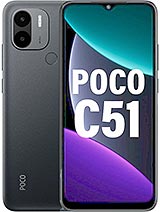
Unlock Your Xiaomi Phone: Permanent Mi Account Removal
Model: Xiaomi Poco C51
Xiaomi Mi Account Removal Service
Unlock your Xiaomi Poco C51 effortlessly with our dedicated service. Follow our straightforward guide to permanently remove the Mi account in just a few minutes.
Supported Models:
- All Xiaomi models
- Any version of Android
- Any version of EMUI
- Clean Xiaomi devices (No reports)
How to Find the FSN MI LOCK CODE for Your Locked Xiaomi or Poco Device
- Turn on your Xiaomi device without Wi-Fi or mobile data. Ensure you are on the lock screen that states, “This device is associated with an existing Mi account.”
- Tap the padlock icon on the screen ten times to retrieve your FSN lock code.
- Copy the FSN lock code displayed on your device as shown in the accompanying image.
- Enter the FSN lock code on our website and proceed to make the payment for the service.
- Wait between 2 to 72 working hours to receive an email with instructions confirming the deletion of the associated Mi account.
Frequently Asked Questions
What is a Xiaomi account used for?
A Xiaomi account is used to access various services, including cloud storage, security features, and device synchronization.
Is it possible to unlock my Mi account?
Yes, you can unlock your Mi account using our account removal service, allowing you to regain access to your device.
Can you remove a Mi account?
Absolutely! Our service specializes in removing Mi accounts, ensuring your Xiaomi device is fully unlocked.
Can a locked Xiaomi phone be unlocked?
Yes, locked Xiaomi phones can be unlocked through our Mi account removal service, restoring full functionality to your device.